Connecting M5Stack devices across distances opens up a world of possibilities for IoT projects, turning isolated hardware into a cohesive, responsive network.
Whether you’re building a remote sensor array or a distributed home automation system, mastering remote communication is the key to scaling your ideas beyond a single desk.
In this tutorial, we will explore the various protocols—from the lightweight efficiency of ESP-NOW to the robust range of 433 Mhz radio frequency units that allow your M5Stack cores to "talk" to one another.
By the end of this guide, you’ll understand how to bridge the physical gap between your devices.
⚠ Lasers can cause harm to the human body. Therefore, when using this product, do not aim it at people, and prevent the laser beam from entering the eyes to avoid injury!
Exercise Level Two - M5Stack RF433 Transmitting and receiving messages.
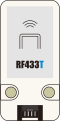
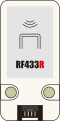
Unit RF433T is a wireless radio frequency (RF) transmitter and Unit RF433R is an RF wireless radio frequency receiver, operating at the commonly used 433.92MHz frequency for wireless controllers.
Note: The RF433R receiver unit is currently not supported on the Esp32-S3 chip, please connect the receiver on a Stick-C or Atom Matrix for this exercise.
For this exercise we will program two controllers with UIFlow2, a transmitting and a receiving controller. The range of the RF433 units is about 10 meters.
First we will program the transmitting controller. Connect the RF433T unit to the controller and add the unit in UIFlow2.
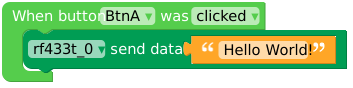
Apply the following codeblock to transmit the text "Hello World!" on a button click event.
Transmit "Hello World!" on a button click.
Now we will program the receiving controller (Non ESP-32 S3).
Connect the RF433R unit to the controller and add the unit in UIFlow2.
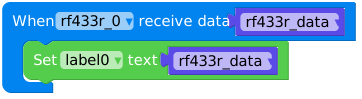
Apply the following codeblock to receive the message and print it out in the serial monitor.
Receive the message.
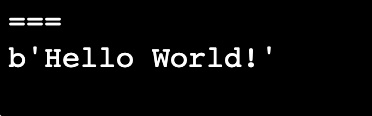
There is one problem with the output, the serial monitor will add a 'b' to the output.
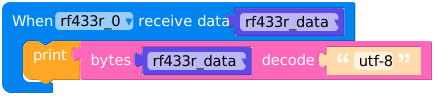
Which means the data is structured (and sent as) bytes. We need to decode the data to a proper string to be able to use it.
Adding a 'decode' block will fix this issue. The decode block can be found in the 'Bytes' section of UIFlow2.
Exercise Level Three - Getting Started with ESP-NOW
ESP-NOW is a connectionless communication protocol developed by Espressif. Unlike standard Wi-Fi, where a device must perform a "handshake" with a router, ESP-NOW allow devices to talk directly to each other using their MAC addresses.
Why use it for M5Stack?
Works on all ESP-32 devices without extra units.
Instant Wake-up: It can send data almost immediately after powering on.
No Router Needed: Works via Wifi but does not require an active network connection (ESP-Now = peer-to-peer).
Multi-Device: One M5Stack can "broadcast" to many others, or talk to specific units.
How do I find my MAC Address?
The Mac address of your device is listed on the sticker on the package, or can be retrieved with a code block (category: System : ESP-NOW):
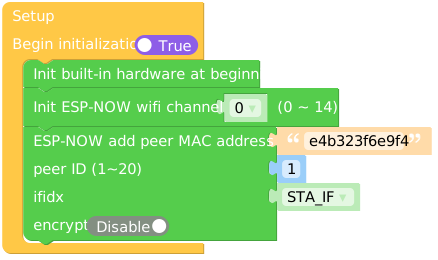
To initialize the ESP-NOW protocol define a wifi channel and add a peer.
The MAC address will be that of the device that will receive the data (not the same as in the example).
You can configure 20 peers as receiving devices. A MAC address format generally consists of 6 hexadecimal digits: E4:B3:23:F6:E9:F4 but must be written as general hexadecimal number: e4b323f6e9f4.
Sending data on button click event:
Receiving ESP-NOW data
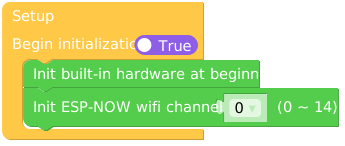
To receive data on a device initialise the ESP-NOW protocol with the same Wifi channel:
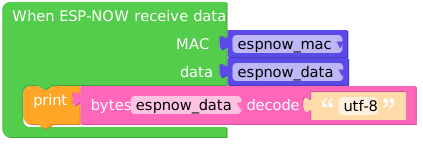
Receive (and decode) ESP_NOW data event:
ESP-NOW can also broadcast data without the need for peer configuration.
Be aware though that any ESP-32 device close by (somewhere around 50 meters) can receive and read the data.


 Transmit "Hello World!" on a button click.